
Kubernetes
We build Kubernetes platforms on your own servers or in the cloud, with configuration in Git and a distribution chosen for your requirements. A scoped pilot can validate the workload and integrations.
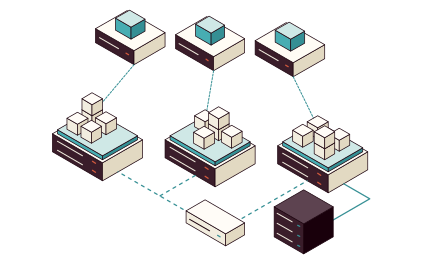
Which Kubernetes fits you?
For every platform we build, we compare the options and choose the one that fits, on your own servers or in the cloud. On your own servers, that is often Talos Linux.
- Talos LinuxA small operating system for Kubernetes. You choose storage, networking and tooling.
- OpenShiftAn integrated application platform, with more built in.
- RancherManagement of many clusters from one place.
- vSphere Kubernetes ServiceKubernetes in your VMware environment. If you are leaving VMware, the clusters move with the servers.
- EKS, AKS and GKEKubernetes run as a service in AWS, Azure or Google Cloud.
A node with nothing to log in to
We choose Talos for Kubernetes on your own infrastructure when security and predictable operations weigh heavily. A small, read-only system has fewer parts to protect and keep updated.
- How it differs from a regular Linux nodeThere, software is installed and changed by hand while the node runs, so nodes drift apart. Every node has a login, and with it a way in.
- The same Kubernetes on topWorkload security is handled in Kubernetes, with network policies, roles and secrets that we set up with you.
- No license cost for the operating systemThe community edition of Talos Linux is open source. Your budget goes to hardware, implementation and operations, and if needed vendor support and Omni.
- An environment you can recreateNodes are managed through an API and versioned configuration, so your team can rebuild the environment and track what changed. If NIS2 applies to you, we also work on access control, traceable changes and documented restores.
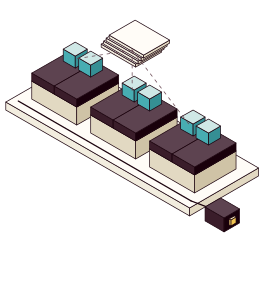
- One machine configurationA declarative document for Talos and Kubernetes, with no scripts or manual steps.
- Read-only systemRuns from a SquashFS image. No shell, no SSH, no package manager.
- A/B upgradesIf the new version fails to boot, the node falls back to the previous one.
- One APIEverything is managed through the Talos API with talosctl, encrypted and key-authenticated.
Every change through Git
Everything on the nodes is managed through an API and configuration. So the platform changes the same way your code does: through pull requests, review and CI, from development and test to production.
- Your pipelines, as todayYour development team builds and tests container images as before.
- Secrets stay out of GitSecrets are encrypted or fetched from a separate system, and never sit in plain text in Git.
- Tested from pull request to clusterA change goes from pull request to cluster, and a revert undoes it. We also rebuild a test cluster from the repository alone.
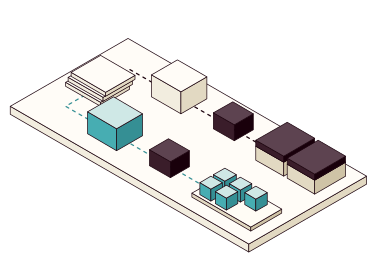
- Your Git repositoryPull request, review and CI before every change.
- Terraform or OpenTofuThe Talos provider creates and applies the machine configuration.
- Talos APIConfigures and upgrades the nodes.
- Flux or Argo CDSyncs manifests and Helm releases from Git.
- Kubernetes APIRolls out the resources in the cluster.
Your workloads and tools on Talos
Talos Linux has no shell and no package manager. Drivers and tools are therefore built into the image, set in the machine configuration or run in Kubernetes, as in these examples. The figure shows what NVIDIA GPUs change in each layer.
- NVIDIA GPUsInference, training and CUDA jobs in Kubernetes. The driver is built into the image, and a test pod runs a CUDA job on the GPU.
- StorageReplicated volumes on the nodes' own disks with Longhorn, Rook/Ceph or CSI against an existing SAN or NAS, and S3-compatible object storage such as Garage, running as an ordinary application in the cluster.
- Private accessYour team reaches the Kubernetes API and selected services privately, for example through Tailscale, with nothing exposed to the internet.
- Multiple sitesOne cluster per site across data center, cloud and edge. Omni can create, upgrade and oversee the clusters, and GitOps delivers the applications.
- On servers or in ProxmoxDirectly on servers when the cluster needs dedicated hardware or GPUs, installed from ISO, PXE or disk image with SecureBoot. Or in Proxmox VMs, to share hardware and quickly create separate test and production clusters.
{opacity:0}@media%20(prefers-reduced-motion:no-preference){.iso-flow%3e*{opacity:0;animation:iso-flow%201.2s%20steps(1)%20infinite}.iso-flow%3e:nth-child(2){animation-delay:.4s}.iso-flow%3e:nth-child(3){animation-delay:.8s}}@keyframes%20iso-flow{0%25{opacity:1}33.333%25{opacity:0}}.iso-line{fill:none;stroke-linecap:round;stroke-linejoin:round;vector-effect:non-scaling-stroke}%3c/style%3e%3cg%20transform='scale(.5)'%3e%3cpath%20class='iso-line%20iso-dashed'%20d='M-156%2090l0%20-300'%20stroke='%236b4a55'%20stroke-width='1'/%3e%3cpath%20class='iso-line%20iso-dashed'%20d='M260%20150l0%20-300'%20stroke='%236b4a55'%20stroke-width='1'/%3e%3cpath%20class='iso-line%20iso-dashed'%20d='M104%20240l0%20-300'%20stroke='%236b4a55'%20stroke-width='1'/%3e%3cg%20class='iso-box'%3e%3cpath%20d='M-156%2078l260%20150%200%2012%20-260%20-150z'%20fill='%23f2eddf'/%3e%3cpath%20d='M260%20138l-156%2090%200%2012%20156%20-90z'%20fill='%23e2d9c2'/%3e%3cpath%20d='M0%20-12l260%20150%20-156%2090%20-260%20-150z'%20fill='%23fffcf7'/%3e%3c/g%3e%3cg%20class='iso-box'%3e%3cpath%20d='M-156%206l260%20150%200%2012%20-260%20-150z'%20fill='%233a1d2a'/%3e%3cpath%20d='M260%2066l-156%2090%200%2012%20156%20-90z'%20fill='%2319000b'/%3e%3cpath%20d='M0%20-84l260%20150%20-156%2090%20-260%20-150z'%20fill='%235d4350'/%3e%3c/g%3e%3cg%20class='iso-box'%3e%3cpath%20d='M-156%20-66l260%20150%200%2012%20-260%20-150z'%20fill='%23e2d9c2'/%3e%3cpath%20d='M260%20-6l-156%2090%200%2012%20156%20-90z'%20fill='%23cfc3a6'/%3e%3cpath%20d='M0%20-156l260%20150%20-156%2090%20-260%20-150z'%20fill='%23fffcf5'/%3e%3c/g%3e%3cg%20class='iso-box'%3e%3cpath%20d='M-156%20-138l260%20150%200%2012%20-260%20-150z'%20fill='%2347adb2'/%3e%3cpath%20d='M260%20-78l-156%2090%200%2012%20156%20-90z'%20fill='%23358f94'/%3e%3cpath%20d='M0%20-228l260%20150%20-156%2090%20-260%20-150z'%20fill='%23cfe8e6'/%3e%3c/g%3e%3cg%20class='iso-box'%3e%3cpath%20d='M-156%20-210l260%20150%200%2012%20-260%20-150z'%20fill='%23ffdf80'/%3e%3cpath%20d='M260%20-150l-156%2090%200%2012%20156%20-90z'%20fill='%23f0c552'/%3e%3cpath%20d='M0%20-300l260%20150%20-156%2090%20-260%20-150z'%20fill='%23fff3c4'/%3e%3c/g%3e%3cg%20class='iso-box'%3e%3cpath%20d='M-24%20-246l27%2016%200%2028%20-27%20-16z'%20fill='%23f2eddf'/%3e%3cpath%20d='M31%20-246l-28%2016%200%2028%2028%20-16z'%20fill='%23e2d9c2'/%3e%3cpath%20d='M3%20-262l28%2016%20-28%2016%20-27%20-16z'%20fill='%23fffcf7'/%3e%3c/g%3e%3cg%20class='iso-box'%3e%3cpath%20d='M24%20-218l28%2016%200%2028%20-28%20-16z'%20fill='%23f2eddf'/%3e%3cpath%20d='M80%20-218l-28%2016%200%2028%2028%20-16z'%20fill='%23e2d9c2'/%3e%3cpath%20d='M52%20-234l28%2016%20-28%2016%20-28%20-16z'%20fill='%23fffcf7'/%3e%3c/g%3e%3cg%20class='iso-box'%3e%3cpath%20d='M73%20-190l27%2016%200%2028%20-27%20-16z'%20fill='%23f2eddf'/%3e%3cpath%20d='M128%20-190l-28%2016%200%2028%2028%20-16z'%20fill='%23e2d9c2'/%3e%3cpath%20d='M100%20-206l28%2016%20-28%2016%20-27%20-16z'%20fill='%23fffcf7'/%3e%3c/g%3e%3c/g%3e%3c/svg%3e)
- ServersGPU in the server, or PCI passthrough to a Talos VM in Proxmox.
- Talos imageSystem extensions: NVIDIA kernel modules and Container Toolkit.
- Machine configKernelModuleConfig loads the NVIDIA modules.
- KubernetesNVIDIA GPU Operator and RuntimeClass nvidia.
- WorkloadPods request nvidia.com/gpu.
Fixed-price pilot cluster
We agree on the workload, number of nodes and integrations, then give you a fixed-price quote.
Hardware advice is available as an option: we help you choose servers, GPUs, storage and networking, and review the vendors' proposals.
- A cluster with your workloadTalos and Kubernetes on servers or in Proxmox, with a representative containerized application.
- Integrations in placeNetworking, access, storage and monitoring, within the pilot's scope.
- Tested upgrade and restoreOf the cluster and the workload's data, with the result documented.
- A basis for productionConfiguration, documentation and a walkthrough of what it takes to go further.
Will you depend on us?
No. Your applications run on standard Kubernetes, and everything that controls the cluster stays with you.
- Upgrade a node with talosctl
- Restore etcd from a snapshot in the test cluster
- Deploy a change through a pull request
- The platform as codeConfiguration and automation in your repositories, with secrets protected.
- Architecture and decisionsCluster, networking, storage and lifecycle, with the reasons behind the choices.
- RunbooksPractical instructions for operations, upgrades and restores.
- Restore test resultsetcd and application data, tested and saved next to the test code.
- Keys to the APIsAccess to the Talos API and Kubernetes stays with you.