
Data centre networks
We design, build and manage data center networks, from one server room to fabrics across several sites and the networks inside GPU clusters. Each gets redundancy where it matters, room to grow and automation from the start.
A fabric built from what the network carries
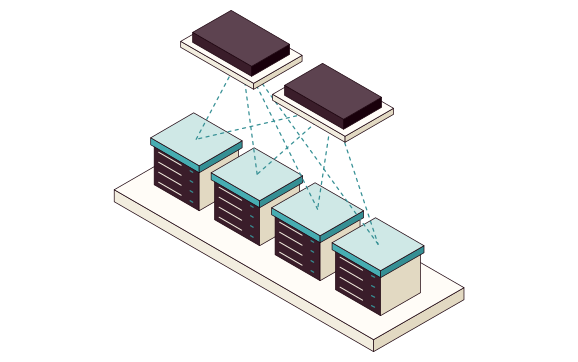
We start from what the network must carry: traffic between servers, storage and the outside world, systems that can't stop, and the racks and sites to come. That often means a spine-leaf fabric with EVPN-VXLAN: the physical part grows by adding switches, and the logical networks change on top.
- Spine and leafPhysical structure Spine and leaf Servers in each rack connect to one leaf switch, or two where they need dual paths, and every leaf connects to every spine, so traffic between any two racks takes the same number of hops. We size it from the racks, the traffic between servers and port speeds, from 25G to 800G, for today and the next expansion.
- EVPN-VXLANLogical networks EVPN-VXLAN VXLAN carries the segments across the physical structure, and EVPN tracks where each address lives. A segment can then span several racks and sites, VRFs keep apart what must stay separate, and names and addresses follow one plan.
- Redundancy where it's neededAvailability Redundancy where it's needed Dual paths through the tiers that carry what can't stop, down to the servers' own connections, so a switch or link can fail or be taken out for maintenance while traffic takes the other path.
{opacity:0}@media%20(prefers-reduced-motion:no-preference){.iso-flow%3e*{opacity:0;animation:iso-flow%201.2s%20steps(1)%20infinite}.iso-flow%3e:nth-child(2){animation-delay:.4s}.iso-flow%3e:nth-child(3){animation-delay:.8s}}@keyframes%20iso-flow{0%25{opacity:1}33.333%25{opacity:0}}.iso-line{fill:none;stroke-linecap:round;stroke-linejoin:round;vector-effect:non-scaling-stroke}%3c/style%3e%3cg%20transform='scale(.5)'%3e%3cg%20class='iso-box'%3e%3cpath%20d='M-225%20110l519%20300%200%2020%20-519%20-300z'%20fill='%23f2eddf'/%3e%3cpath%20d='M520%20280l-226%20130%200%2020%20226%20-130z'%20fill='%23e2d9c2'/%3e%3cpath%20d='M0%20-20l520%20300%20-226%20130%20-519%20-300z'%20fill='%23fffcf7'/%3e%3c/g%3e%3cg%20class='iso-box'%3e%3cpath%20d='M-28%2020l90%2052%200%2024%20-90%20-52z'%20fill='%2347adb2'/%3e%3cpath%20d='M107%2046l-45%2026%200%2024%2045%20-26z'%20fill='%23358f94'/%3e%3cpath%20d='M17%20-6l90%2052%20-45%2026%20-90%20-52z'%20fill='%23cfe8e6'/%3e%3c/g%3e%3cg%20class='iso-box'%3e%3cpath%20d='M90%2088l90%2052%200%2024%20-90%20-52z'%20fill='%2347adb2'/%3e%3cpath%20d='M225%20114l-45%2026%200%2024%2045%20-26z'%20fill='%23358f94'/%3e%3cpath%20d='M135%2062l90%2052%20-45%2026%20-90%20-52z'%20fill='%23cfe8e6'/%3e%3c/g%3e%3cg%20class='iso-box'%3e%3cpath%20d='M208%20156l90%2052%200%2024%20-90%20-52z'%20fill='%2347adb2'/%3e%3cpath%20d='M343%20182l-45%2026%200%2024%2045%20-26z'%20fill='%23358f94'/%3e%3cpath%20d='M253%20130l90%2052%20-45%2026%20-90%20-52z'%20fill='%23cfe8e6'/%3e%3c/g%3e%3cg%20class='iso-box%20iso-dashed'%3e%3cpath%20d='M326%20224l90%2052%200%2024%20-90%20-52z'%20fill='%23f2eddf'/%3e%3cpath%20d='M461%20250l-45%2026%200%2024%2045%20-26z'%20fill='%23e2d9c2'/%3e%3cpath%20d='M371%20198l90%2052%20-45%2026%20-90%20-52z'%20fill='%23fffcf7'/%3e%3c/g%3e%3cpath%20class='iso-line'%20d='M17%2070l11%20110'%20stroke='%2319000b'%20stroke-width='1.6'/%3e%3cpath%20class='iso-line'%20d='M17%2070l184%20210'%20stroke='%2319000b'%20stroke-width='1.6'/%3e%3cpath%20class='iso-line'%20d='M135%20138l-107%2042'%20stroke='%2319000b'%20stroke-width='1.6'/%3e%3cpath%20class='iso-line'%20d='M135%20138l66%20142'%20stroke='%2319000b'%20stroke-width='1.6'/%3e%3cpath%20class='iso-line'%20d='M253%20206l-225%20-26'%20stroke='%2319000b'%20stroke-width='1.6'/%3e%3cpath%20class='iso-line'%20d='M253%20206l-52%2074'%20stroke='%2319000b'%20stroke-width='1.6'/%3e%3cpath%20class='iso-line%20iso-dashed'%20d='M371%20274l-343%20-94'%20stroke='%2319000b'%20stroke-width='1.6'/%3e%3cpath%20class='iso-line%20iso-dashed'%20d='M371%20274l-170%206'%20stroke='%2319000b'%20stroke-width='1.6'/%3e%3cg%20class='iso-box'%3e%3cpath%20d='M-83%20140l131%2076%200%2028%20-131%20-76z'%20fill='%233a1d2a'/%3e%3cpath%20d='M94%20190l-46%2026%200%2028%2046%20-26z'%20fill='%2319000b'/%3e%3cpath%20d='M-38%20114l132%2076%20-46%2026%20-131%20-76z'%20fill='%235d4350'/%3e%3c/g%3e%3cg%20class='iso-box'%3e%3cpath%20d='M90%20240l132%2076%200%2028%20-132%20-76z'%20fill='%233a1d2a'/%3e%3cpath%20d='M267%20290l-45%2026%200%2028%2045%20-26z'%20fill='%2319000b'/%3e%3cpath%20d='M135%20214l132%2076%20-45%2026%20-132%20-76z'%20fill='%235d4350'/%3e%3c/g%3e%3cpath%20class='iso-line%20iso-dashed'%20d='M40%2033l0%20-60'%20stroke='%2319000b'%20stroke-width='1.2'/%3e%3cpath%20class='iso-line%20iso-dashed'%20d='M275%20169l0%20-60'%20stroke='%2319000b'%20stroke-width='1.2'/%3e%3cpath%20class='iso-floor'%20d='M0%20-68l346%20200%20-31%2018%20-346%20-200z'%20fill='%23eb725466'/%3e%3cg%20class='iso-box'%3e%3cpath%20d='M-12%20-67l24%2014%200%2022%20-24%20-14z'%20fill='%23eb7254'/%3e%3cpath%20d='M33%20-65l-21%2012%200%2022%2021%20-12z'%20fill='%23d2593c'/%3e%3cpath%20d='M9%20-79l24%2014%20-21%2012%20-24%20-14z'%20fill='%23fbd3c6'/%3e%3c/g%3e%3cg%20class='iso-box'%3e%3cpath%20d='M223%2069l25%2014%200%2022%20-25%20-14z'%20fill='%23eb7254'/%3e%3cpath%20d='M268%2071l-20%2012%200%2022%2020%20-12z'%20fill='%23d2593c'/%3e%3cpath%20d='M244%2057l24%2014%20-20%2012%20-25%20-14z'%20fill='%23fbd3c6'/%3e%3c/g%3e%3cpath%20class='iso-line%20iso-dashed'%20d='M158%20101l0%20-112'%20stroke='%2319000b'%20stroke-width='1.2'/%3e%3cpath%20class='iso-line%20iso-dashed'%20d='M275%20169l0%20-112'%20stroke='%2319000b'%20stroke-width='1.2'/%3e%3cpath%20class='iso-floor'%20d='M118%20-52l228%20132%20-31%2018%20-228%20-132z'%20fill='%23ffdf8099'/%3e%3cg%20class='iso-box'%3e%3cpath%20d='M106%20-51l24%2014%200%2022%20-24%20-14z'%20fill='%23ffdf80'/%3e%3cpath%20d='M151%20-49l-21%2012%200%2022%2021%20-12z'%20fill='%23f0c552'/%3e%3cpath%20d='M126%20-63l25%2014%20-21%2012%20-24%20-14z'%20fill='%23fff3c4'/%3e%3c/g%3e%3cg%20class='iso-box'%3e%3cpath%20d='M223%2017l25%2014%200%2022%20-25%20-14z'%20fill='%23ffdf80'/%3e%3cpath%20d='M268%2019l-20%2012%200%2022%2020%20-12z'%20fill='%23f0c552'/%3e%3cpath%20d='M244%205l24%2014%20-20%2012%20-25%20-14z'%20fill='%23fff3c4'/%3e%3c/g%3e%3cpath%20class='iso-floor%20iso-dashed'%20d='M0%20-172l464%20268%20-31%2018%20-464%20-268z'%20fill='none'/%3e%3c/g%3e%3c/svg%3e)
- Segments and VRFsLogical networks on top of the fabric. VXLAN carries them between racks and EVPN tracks where each address lives.
- Physical fabricLeaf and spine switches and the links between them carry every network.
- New segmentAdded in configuration. The physical structure doesn't change.
- Next rackOne more leaf switch, connected to both spine switches.
Automation and monitoring from the start
A network that will grow for years must be safe to change, so automation and monitoring are built into the design.
- Configuration as codeSwitch configuration lives in a repository and rolls out through a pipeline that validates every change. Every change is reviewed first and can be rolled back.
- Monitoring by what the network carriesAlerts show which systems and flows are affected, not just which port went down, for example from telemetry the switches stream over gNMI.
- CapacityLinks and ports are tracked, so the next expansion is planned before it's needed.
How a network project usually runs
The implementation plan is made together with the design, so the business can keep running throughout.
- DiscoveryWhat the network must carry, and what must stay separate The existing network and what's connected The systems that can't stop, and what they need Result The requirements that design and implementation start from
- DesignTopology and redundancy Segments, VRFs and address plan Automation and monitoring Result Target architecture with the reasons behind each decision
- ImplementationIn stages while the business keeps running A plan and a way back for every step Flow checks after each stage Result A deployed network with documented configuration
- ManagementDocumentation and runbooks Changes through automation Ongoing help as the network grows Result A network your team can run and extend
A network your team can run
We write documentation and runbooks for the people who will run the network, and walk through them together before handover. We stay available as the network grows.
- Add a segment through the automation
- Replace a leaf switch by the runbook
- Trace an alert to the systems it affects
- Architecture and decisionsTopology, redundancy and segments, with the reasons behind them.
- Configuration as codeSwitch configuration and templates in your repository.
- Segment and address planWhich segments and VRFs exist, and what they carry.
- RunbooksReplacing a switch, adding a rack and troubleshooting.
- MonitoringAlerts and views tied to what the network carries.