
Cloud and hybrid
We build cloud environments in AWS, where we are an Advanced Tier Services Partner, in Azure and in Google Cloud, and hybrid setups where part stays in your own data center. We start from where each workload fits best, not from a particular provider.
When we help
- First workloads in the cloudYou are starting in the cloud and want a foundation in place before anything moves.
- A cloud environment that has grownAccounts, networking and permissions have grown piece by piece and need a review.
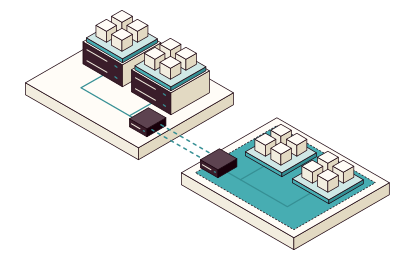
- Both cloud and your own data centerPart stays in your data center, and the two sides need to work together.
- Costs that are hard to followThe bill arrives, but you can't see which service or team it belongs to.
Where each workload fits best
We start with the workloads, not a provider. How a workload varies, where its data may live and what it depends on decide where it belongs, and the platform follows: a landing zone in the cloud, for example, or Kubernetes or Proxmox VE on your own servers.
- In the cloudWorkloads that vary a lot, need to scale fast or build on services the cloud provider runs.
- On your premisesWorkloads with steady load, data that must stay with you and systems that are hard to move.
- In bothServices that must run in the cloud and in your data center, or move between them, without being rewritten.
Landing zone first
A landing zone is the foundation workloads move into: accounts, networking, access and cost tracking, described as code. It is often a sensible first step.
- Accounts and subscriptionsProduction, test and shared services kept apart, so a mistake in one environment stays there.
- NetworkingAddress plan, traffic between the accounts and the link to your data center.
- AccessRoles tied to your existing login, with the permissions each role needs and no more.
- Cost trackingTags and budgets per team and service, so cost can be followed from day one.
- As codeEverything as code in your repository, for example in Terraform or OpenTofu, so the landing zone can be reviewed and rebuilt.
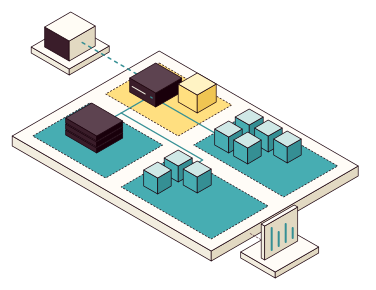
- NetworkingA hub for traffic between the accounts.
- AccessRoles through your login.
- One account per environmentProduction, test and logs kept apart.
- LinkTo your data center.
- Cost per teamTags and budgets from day one.
From assessment to operations
Each step leaves something usable, whoever takes the next one.
- AssessmentWhat runs today and how it is used Dependencies and requirements for data and availability Cost today and in the cloud Result A proposal for where each workload fits, with the reasons
- Landing zoneAccounts or subscriptions Networking and the link to your data center Access and cost tracking Result A foundation described as code in your repository
- First workloadsOne or a few workloads moved or built new Delivery pipeline, logging and alerts Tested restore Result Workloads running on the new foundation
- OperationsCost per team and service Runbooks for common changes Continued support if you want it Result Your team runs and changes the environment
One platform in the cloud and your own data center
If services must run in both places, they need to be deployed the same way in both. Otherwise every move becomes a project of its own.
- The same platformFor example Kubernetes in both environments, so teams deploy the same way wherever the service runs.
- The same access and logging requirementsRoles, logging and monitoring are in place from the start, in both environments.
- Costs where teams see themThe cost per service reaches the team that owns it, so deviations show without a separate report.
You own the foundation
The code, documentation and access stay with you, so your team can change the environment and rebuild it without us.
- Add an account or subscription through the code
- Follow the cost of a service, from tag to report
- Rebuild a test environment from the code
- The landing zone as codeAccounts, networking, access and budgets in your repository, with a history of every change.
- Architecture and decisionsWhere the workloads run and why, so the next decision can start from the same basis.
- RunbooksCommon changes, such as a new account or service, changed access and a restore.
- Access and ownersAccounts and keys stay with you, with a named owner for each part.