
AI infrastructure
From one GPU server to a cluster many teams share, we build the platform your models run on: for serving them, fine-tuning them on your data and training across many GPUs.
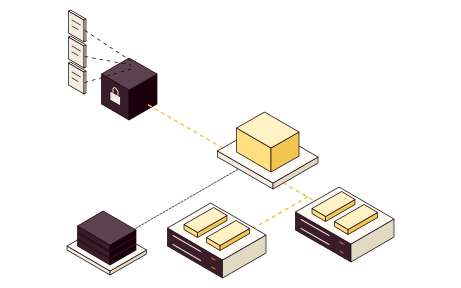
Inference, fine-tuning and distributed training
Models that answer requests, fine-tuning on your own data and training across many servers each ask something different of the platform. The figure under the table shows a platform that runs them, and the path a request takes through it.
| Workload | How it runs | What shapes the platform |
| Inference | Models answer requests behind an API. | Response time, throughput under concurrent requests, memory for the model and its context, and availability. |
| Fine-tuning | An existing model is adapted to your data, in jobs with scheduling, datasets and experiment tracking. An interrupted job restarts from its latest checkpoint. | GPU memory, access to datasets, and runs you can reproduce and trace. |
| Distributed training | Training across many GPUs and servers. | Communication between the GPUs, the network fabric, storage for checkpoints, and restarts after failures. |
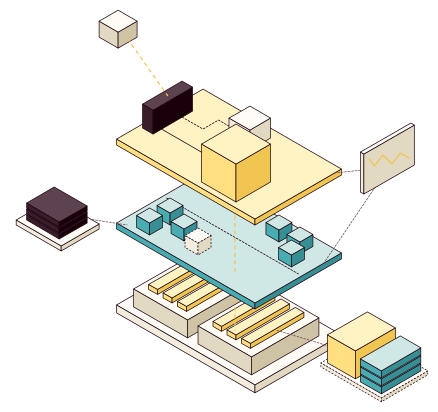
- Model APIAuthentication and network protection in front of the runtime, plus routing and model versions.
- Serving runtimeFor example vLLM or SGLang, with capacity control.
- Quotas and schedulingSeparation between teams, and scheduling of jobs and GPUs.
- ObservabilityGPU use, response times, errors and queues, with alerts tied to your operations.
- Data and modelsDatasets, model artifacts and experiments, and checkpoints to restart interrupted jobs.
- GPU support in the platformKubernetes with a device plugin or GPU Operator, Linux or virtual machines.
- GPU serversDrivers and container runtime validated against your hardware.
- GPU memoryHolds the model and the context for each request.
What drives sizing
Five factors decide how much GPU memory and capacity a workload needs. Try model size, concurrent requests and precision on a schematic GPU. The figure assumes long context and isn't to scale.
- Model sizeSets the memory needed per GPU and whether the model must be split across several GPUs.
- Concurrent requestsThe number of concurrent requests affects throughput, queues and how much memory is used.
- Context lengthLonger input and output need more memory per request and mean longer response times.
- PrecisionLower precision and quantization reduce memory needs, but quality has to be tested for your use.
- Workload patternSteady load, peaks or batch jobs shape scheduling, quotas and how capacity is shared.
{opacity:0}@media%20(prefers-reduced-motion:no-preference){.iso-flow%3e*{opacity:0;animation:iso-flow%201.2s%20steps(1)%20infinite}.iso-flow%3e:nth-child(2){animation-delay:.4s}.iso-flow%3e:nth-child(3){animation-delay:.8s}}@keyframes%20iso-flow{0%25{opacity:1}33.333%25{opacity:0}}.iso-line{fill:none;stroke-linecap:round;stroke-linejoin:round;vector-effect:non-scaling-stroke}%3c/style%3e%3cg%20transform='scale(.5)'%3e%3cg%20class='iso-box'%3e%3cpath%20d='M-132%2060l243%20140%200%2016%20-243%20-140z'%20fill='%233a1d2a'/%3e%3cpath%20d='M242%20124l-131%2076%200%2016%20131%20-76z'%20fill='%2319000b'/%3e%3cpath%20d='M0%20-16l242%20140%20-131%2076%20-243%20-140z'%20fill='%235d4350'/%3e%3c/g%3e%3cg%20class='iso-box'%3e%3cpath%20d='M-97%200l208%20120%200%2060%20-208%20-120z'%20fill='%23ffdf80'/%3e%3cpath%20d='M208%2064l-97%2056%200%2060%2097%20-56z'%20fill='%23f0c552'/%3e%3cpath%20d='M0%20-56l208%20120%20-97%2056%20-208%20-120z'%20fill='%23fff3c4'/%3e%3c/g%3e%3cg%20class='iso-box'%3e%3cpath%20d='M-97%20-27l208%20120%200%2026%20-208%20-120z'%20fill='%2347adb2'/%3e%3cpath%20d='M208%2037l-97%2056%200%2026%2097%20-56z'%20fill='%23358f94'/%3e%3cpath%20d='M0%20-83l208%20120%20-97%2056%20-208%20-120z'%20fill='%23cfe8e6'/%3e%3c/g%3e%3cg%20class='iso-box'%3e%3cpath%20d='M-97%20-55l208%20120%200%2026%20-208%20-120z'%20fill='%2347adb2'/%3e%3cpath%20d='M208%209l-97%2056%200%2026%2097%20-56z'%20fill='%23358f94'/%3e%3cpath%20d='M0%20-111l208%20120%20-97%2056%20-208%20-120z'%20fill='%23cfe8e6'/%3e%3c/g%3e%3cpath%20class='iso-floor%20iso-dashed'%20d='M0%20-160l208%20120%20-97%2056%20-208%20-120z'%20fill='none'/%3e%3cpath%20class='iso-floor%20iso-dashed'%20d='M-97%20-104l208%20120%200%20164%20-208%20-120z'%20fill='none'/%3e%3cpath%20class='iso-floor%20iso-dashed'%20d='M111%2016l97%20-56%200%20164%20-97%2056z'%20fill='none'/%3e%3c/g%3e%3c/svg%3e)
- Model weights
- Context per request
- GPU memory
- Fits in one GPU
Linux, Kubernetes or virtual machine
The choice depends on the workload, how GPUs will be shared and what you already run, on existing or new hardware.
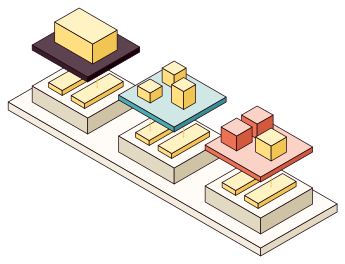
- Linux directly on the serverFor one model or job per server: the GPU server runs Linux and a serving runtime for the model.
- Kubernetes on Talos LinuxFor GPUs shared across models, teams and jobs: scheduling and resource sharing for models and training jobs.
- Virtual machine with a GPU on ProxmoxFor a GPU workload alongside your virtual machines: GPU passthrough and a separate runtime environment in Proxmox VE.
- New hardwareIf you're buying GPU servers, we size servers, storage and network fabric from the workload and compare the vendors' proposals.
- Linux
- Kubernetes
- Proxmox VE
- GPU servers
From sizing to measurement
We often start with a sizing that takes one or a few days. If you're buying hardware, we specify it, and you and your vendors buy and install it. Then we configure the platform and measure it with your own requests and data.
- SizingModels, requests and data Inference, fine-tuning or training GPU, memory, storage and network needs Result Workload profile and hardware needs
- SpecificationGPU, CPU, memory and storage based on the workload Topology, network fabric and GPU-to-GPU links Rack, power and cooling requirements where needed Comparison of the vendors' proposals Result Basis for purchasing, topology and capacity
- You buy and installPurchasing from your vendors Racks, cabling and power Hardware repair Result Hardware in place according to the specification
- PlatformDrivers and container runtime GPU support, quotas and job environment Serving runtime and model API The logical networks Result A platform configured to the agreed requirements
- MeasurementResponse time Throughput Memory use Behavior on failure and restart Result Results are reported before anything goes into production
You can run the platform yourselves
The specifications, measurement results and runbooks are yours, so your team can run, upgrade and restart the platform.
- Deploy a new model version behind the API
- Restart an interrupted training job from a checkpoint
- Upgrade drivers in a test environment
- The platform as codeConfiguration in your repository, with the documentation beside it.
- Platform designThe workload profile and the design, with the reasons behind it.
- Compatibility matrixHardware, drivers and versions tested together.
- Measurement reportMeasured values for your workload under the agreed load.
- RunbooksOperations, upgrades and restarts.
- Access and ownersAccounts and keys stay with you, with a named owner for each part.