
Campus & WAN
We design and build the networks in and between your sites, from offices and warehouses to data centers, with redundancy where it matters, segments that keep parts of the business apart and monitoring that names the site.
When we help
- A new siteA site such as a new office, warehouse or data center needs to connect to the rest of the business.
- A network that grew site by siteEach site was built differently and needs one common design.
- Parts that must stay separateOffices, guests and the systems that run operations share one network today.
- Outages you see too lateYou want to see which sites are affected when a link goes down.
Each site by what it does
Every site makes its own demands on the network, so we design each from what it must handle and what it needs to reach at the others. Here is how three common kinds of site differ.
- Where people workOffice Where people work Workstations, meeting rooms, printers and guests, on cable and on wireless such as Wi-Fi 7. Staff, guests and equipment get their own segments, and users reach systems in the data center and the cloud.
- Where operations can't stopWarehouse Where operations can't stop Automation, scanners and control systems that need the network all shift, so an outage hits deliveries immediately. The automation gets its own segments, and dual paths where it needs them.
- Where the systems liveData center Where the systems live The systems that offices and warehouses use, and the links on to the cloud and the internet. We connect the site networks to it, with capacity for what runs where.
Redundancy and monitoring per site
Not every site needs two links. We start from what an outage costs at each site and put redundancy where it matters.
- Two paths where neededA second link for sites that can't stop, for example fiber from another provider or 5G, and a failover that has been tested.
- A plan where that's enoughFor other sites, one link and an outage plan can be the right level.
- Alerts that name the siteMonitoring shows which site and which flows are affected, not just that an interface is down.
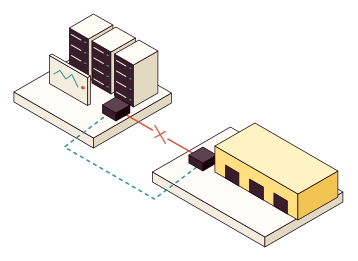
- Alerts per siteShows the warehouse is on its backup path, not just that an interface is down.
- OutageThe usual link to the warehouse goes down.
- Backup pathTraffic takes the second link and the warehouse keeps working.
- WarehouseA site that can't stop has two links.
Segmentation between parts of the business
The network keeps parts of the business apart, so a problem in one place doesn't reach everything else.
- The same segments at every siteStaff, guests, automation and servers use the same segments and names everywhere, so rules and troubleshooting work the same way.
- Only the flows you needTraffic allowed between offices, warehouses and data centers is documented, and nothing else gets through.
- Guests kept apartGuests and personal devices sit on their own segment, with no path into business systems.
- Rules you can reviewEvery rule between segments has a purpose and an owner.
An accurate picture of the network
You get documentation of the sites and links that matches what's running, and runbooks for what happens most often. We stay available when you add new sites.
- Trace an alert to the site and flows it affects
- Test the backup path taking over and handing back
- Connect a new site by the runbook
- Sites and linksWhich sites exist, how they connect and which paths traffic takes.
- Segment planThe segments at each site and the flows between them.
- Monitoring per siteAlerts and views that show how each site is affected.
- RunbooksAdding a site, replacing a link and troubleshooting.