
Inference and serving
We turn open models, your own models and providers' APIs into a service. Runtime choices and settings are measured on your requests against your quality requirements.
{opacity:0}@media%20(prefers-reduced-motion:no-preference){.iso-flow%3e*{opacity:0;animation:iso-flow%201.2s%20steps(1)%20infinite}.iso-flow%3e:nth-child(2){animation-delay:.4s}.iso-flow%3e:nth-child(3){animation-delay:.8s}}@keyframes%20iso-flow{0%25{opacity:1}33.333%25{opacity:0}}.iso-line{fill:none;stroke-linecap:round;stroke-linejoin:round;vector-effect:non-scaling-stroke}%3c/style%3e%3cg%20transform='scale(.5)'%3e%3cg%20class='iso-box'%3e%3cpath%20d='M-236%20120l319%20184%200%2016%20-319%20-184z'%20fill='%23f2eddf'/%3e%3cpath%20d='M319%20168l-236%20136%200%2016%20236%20-136z'%20fill='%23e2d9c2'/%3e%3cpath%20d='M0%20-16l319%20184%20-236%20136%20-319%20-184z'%20fill='%23fffcf7'/%3e%3c/g%3e%3cg%20class='iso-flow'%3e%3cpath%20class='iso-line'%20d='M-55%2080l52%2030%2076%20-44%2052%2030'%20stroke='%23f0c552'%20stroke-width='2.5'%20stroke-dashoffset='0'/%3e%3cpath%20class='iso-line'%20d='M-55%2080l52%2030%2076%20-44%2052%2030'%20stroke='%23f0c552'%20stroke-width='2.5'%20stroke-dashoffset='-5'/%3e%3cpath%20class='iso-line'%20d='M-55%2080l52%2030%2076%20-44%2052%2030'%20stroke='%23f0c552'%20stroke-width='2.5'%20stroke-dashoffset='-10'/%3e%3c/g%3e%3cg%20class='iso-flow'%3e%3cpath%20class='iso-line'%20d='M-55%2080l52%2030%200%200%2051%2030'%20stroke='%23f0c552'%20stroke-width='2.5'%20stroke-dashoffset='0'/%3e%3cpath%20class='iso-line'%20d='M-55%2080l52%2030%200%200%2051%2030'%20stroke='%23f0c552'%20stroke-width='2.5'%20stroke-dashoffset='-5'/%3e%3cpath%20class='iso-line'%20d='M-55%2080l52%2030%200%200%2051%2030'%20stroke='%23f0c552'%20stroke-width='2.5'%20stroke-dashoffset='-10'/%3e%3c/g%3e%3cpath%20class='iso-line%20iso-dashed'%20d='M-55%2080l52%2030%20-77%2044%2052%2030'%20stroke='%23f0c552'%20stroke-width='2.5'/%3e%3cg%20class='iso-box'%3e%3cpath%20d='M-132%2028l42%2024%200%2056%20-42%20-24z'%20fill='%233a1d2a'/%3e%3cpath%20d='M-21%2012l-69%2040%200%2056%2069%20-40z'%20fill='%2319000b'/%3e%3cpath%20d='M-62%20-12l41%2024%20-69%2040%20-42%20-24z'%20fill='%235d4350'/%3e%3c/g%3e%3cpath%20class='iso-floor'%20d='M-121%2078l21%2012%200%20-18%20-21%20-12z'%20fill='%23f2eddf'/%3e%3cpath%20class='iso-line'%20d='M-116%2063l0%20-8%203%20-2%204%202%203%206%200%208'%20stroke='%23f2eddf'%20stroke-width='1.8'/%3e%3cg%20class='iso-box'%3e%3cpath%20d='M180%20136l7%204%200%2080%20-7%20-4z'%20fill='%23f2eddf'/%3e%3cpath%20d='M288%2082l-101%2058%200%2080%20101%20-58z'%20fill='%23e2d9c2'/%3e%3cpath%20d='M281%2078l7%204%20-101%2058%20-7%20-4z'%20fill='%23fffcf7'/%3e%3c/g%3e%3cpath%20class='iso-line'%20d='M277%20148l-17%20-10%20-18%2022%20-17%20-18%20-17%2022%20-11%20-14'%20stroke='%23f0c552'%20stroke-width='2.5'/%3e%3cg%20class='iso-box'%3e%3cpath%20d='M94%2098l100%2058%200%2024%20-100%20-58z'%20fill='%23e2d9c2'/%3e%3cpath%20d='M256%20120l-62%2036%200%2024%2062%20-36z'%20fill='%23cfc3a6'/%3e%3cpath%20d='M156%2062l100%2058%20-62%2036%20-100%20-58z'%20fill='%23fffcf5'/%3e%3c/g%3e%3cg%20class='iso-box'%3e%3cpath%20d='M118%2060l73%2042%200%2040%20-73%20-42z'%20fill='%23ffdf80'/%3e%3cpath%20d='M232%2078l-41%2024%200%2040%2041%20-24z'%20fill='%23f0c552'/%3e%3cpath%20d='M159%2036l73%2042%20-41%2024%20-73%20-42z'%20fill='%23fff3c4'/%3e%3c/g%3e%3cg%20class='iso-box'%3e%3cpath%20d='M17%20142l101%2058%200%2024%20-101%20-58z'%20fill='%23e2d9c2'/%3e%3cpath%20d='M180%20164l-62%2036%200%2024%2062%20-36z'%20fill='%23cfc3a6'/%3e%3cpath%20d='M80%20106l100%2058%20-62%2036%20-101%20-58z'%20fill='%23fffcf5'/%3e%3c/g%3e%3cg%20class='iso-box'%3e%3cpath%20d='M42%20104l72%2042%200%2040%20-72%20-42z'%20fill='%23ffdf80'/%3e%3cpath%20d='M156%20122l-42%2024%200%2040%2042%20-24z'%20fill='%23f0c552'/%3e%3cpath%20d='M83%2080l73%2042%20-42%2024%20-72%20-42z'%20fill='%23fff3c4'/%3e%3c/g%3e%3cg%20class='iso-box%20iso-dashed'%3e%3cpath%20d='M-59%20186l101%2058%200%2024%20-101%20-58z'%20fill='%23f2eddf'/%3e%3cpath%20d='M104%20208l-62%2036%200%2024%2062%20-36z'%20fill='%23e2d9c2'/%3e%3cpath%20d='M3%20150l101%2058%20-62%2036%20-101%20-58z'%20fill='%23fffcf7'/%3e%3c/g%3e%3cg%20class='iso-box%20iso-dashed'%3e%3cpath%20d='M-35%20148l73%2042%200%2040%20-73%20-42z'%20fill='%23f2eddf'/%3e%3cpath%20d='M80%20166l-42%2024%200%2040%2042%20-24z'%20fill='%23e2d9c2'/%3e%3cpath%20d='M7%20124l73%2042%20-42%2024%20-73%20-42z'%20fill='%23fffcf7'/%3e%3c/g%3e%3cpath%20class='iso-line%20iso-dashed'%20d='M184%20186l-94%2050%20-17%20-10'%20stroke='%236b4a55'%20stroke-width='1.5'/%3e%3c/g%3e%3c/svg%3e)
What turns a model into a service
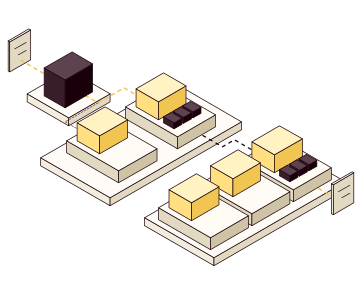
A model that works in a notebook has no API, no queue and no plan for when load grows. Whatever the model, from a large language model to a classical one, we build what it takes to run it as a service.
- A runtime that fits the model and hardwareLanguage models need a serving engine built for them; other models need less. Not every model needs a GPU, and when the choice isn't obvious, we measure both.
- Batching and queues that fit how it's calledWhen someone waits for the answer, queues stay short and batches wait only so long. For large jobs, bigger batches lower the cost per request.
- Autoscaling to real loadThe number of replicas follows the queue and response times. Capacity starts when load grows and shuts down when it falls.
- An API the rest of your systems can rely onAuthentication, model versions and clear errors, so other services can call the model like any other service.
- API
- ReplicasThe model in its runtime, each on one GPU.
- Queue and response timeThe metrics that drive scaling.
- New replicaStarts when load grows and shuts down when it falls.
Tune serving to the model
Language models behave unlike other services under load, and the largest gains come from working with that. We build on open serving engines such as vLLM and SGLang, tune them to your model, and measure each change on your requests.
- One GPU serves many users at onceContinuous batching lets new requests join running batches. Tune batching to interactive response-time requirements or batch throughput, and measure the result on your requests.
- Memory decides how many fitEach request keeps a KV cache, its state for the tokens so far, which grows with the context. PagedAttention keeps it in small blocks like memory pages, so little GPU memory goes to waste, and an 8-bit (FP8) KV cache instead of a 16-bit one leaves room for more requests or longer contexts. We check the answers on your test data.
- The same start isn't computed twiceRequests often begin alike, with a system prompt, shared documents or the earlier turns of a chat. Prefix caching reads that part from the cache instead of computing it again, so the first token arrives sooner.
- Checking tokens is faster than writing themIn speculative decoding, a small draft model, or the model's own multi-token prediction (MTP) layers, proposes several tokens, and the model checks them all in one step: faster output, same quality.
- Kernels and settings tuned to your modelTune attention and matrix kernels, compilation, parallelism and batch limits to the model and hardware. Measure each change against your quality and cost requirements.
Many GPUs that serve as one
Larger models and workloads can use multiple GPUs and separate prefill and decode pools. Validate runtime, hardware compatibility and communication on your platform. Kubernetes tooling such as llm-d can coordinate serving and routing.
- Prompt and answer on separate GPUsReading the prompt (prefill) is limited by compute, and writing the answer (decode) by memory. Run in separate pools, each is sized on its own, and long prompts don't stall answers in progress.
- Each request where its prefix is cachedllm-d's router, the endpoint picker of the Kubernetes Gateway API Inference Extension, weighs each replica's cached prefixes against its load.
- KV cache beyond GPU memoryKV cache evicted from GPU memory moves to CPU memory or storage, so a later request can load it back instead of computing it again.
- The largest models over many nodes
- RouterSends each request where its prefix is cached.
- Cached prefix
- Prefill poolProcesses the prompt.
- KV cacheHanded to a decode replica.
- Decode poolWrites the answer, token by token.
One endpoint for every model
When teams use both models you host and providers' APIs, each app shouldn't handle its own keys, limits and fallbacks. We put a gateway in front of them all, for example agentgateway or Agent Router, and your own models keep their cache-aware routing behind it.
- One OpenAI-compatible APIApps call one endpoint, whether the model runs on your GPUs or at OpenAI, Anthropic, AWS Bedrock, Azure or Google. Switching models means changing a name, not code.
- Keys stay in the gatewayProvider keys live in the gateway, not in each app. Apps and people sign in to the gateway with their own keys or through your identity provider.
- Limits counted in tokensRate limits and quotas count tokens, not just requests, per team, app or model, so one runaway job can't use up the budget.
- Routing and fallbackEach request goes to the model it names, and falls back to another provider or your own replicas when one fails.
- Usage and cost per teamToken use and spend per team, user and model, in the monitoring you already have.
What we measure
We measure with your own requests and data, under a load we agree on, starting from these metrics. The same ones apply when the model, hardware or setup changes.
| Metric | Why |
| Latency, median and p95 | How the service feels to users, even under load. |
| Time to first token and between tokens | For language models: how soon the answer starts, and how fast it streams. |
| Throughput per replica | How much the service can handle and when it needs to scale. |
| GPU, CPU and memory use | Where the bottleneck is and what can be co-located. |
| Cost per request | To compare models, hardware and setups. |
| Quality on your test data | So optimization doesn't degrade the results. |
From assessment to operations
We start with how the service will be called and what you have, and end with a service in production your team can run.
- AssessmentHow the service is called, and by whom Response-time and availability requirements Existing hardware, GPU or CPU Result A proposed setup, with estimated cost per request
- ServiceA runtime that fits the model Batching and queues An API with authentication and versions Result The model as a service in a test environment
- MeasurementLoad from your own requests Latency, throughput and resource use Quality on your test data Result Measured values against your requirements
- OperationsAutoscaling to real load Monitoring and alerts New model versions behind the same API Result The service in production, with runbooks
Around the service
- The platform underneathGPU support, quotas between teams and monitoring, for inference and training.
- When it costs too muchQuantization, smaller models, caching and kernels tuned to the model, measured against the same requirements and test data.
- New model versionsVersioning, evaluation and deployment, and tracking quality over time.
- The hardwareServers, accelerators and networks, specified before you buy.
You can run the service yourselves
The configuration, measurement results and runbooks are yours, so your team can deploy new versions and monitor the service.
- Deploy a new model version behind the API
- Rerun the load test and compare the results
- Work through a response-time alert with the runbook
- The service as codeRuntime, API and scaling in your repository.
- Measurement reportLatency, throughput, resource use, cost per request and quality on your test data.
- Load testScripts and test data, so the measurement can be repeated.
- RunbooksDeploying new versions, scaling and troubleshooting.
- Access and ownersAccounts and keys stay with you, with a named owner for each part.